If you run a Magento store, you know the familiar response to a new operating requirement: install an extension.
Sometimes that is exactly right. A payment processor, shipping carrier, tax service or storefront component adds a capability the store does not have.
Other extensions package human work around data and actions Magento already exposes. They produce another report, send another alert, import another CSV or give you another admin screen for a change Magento can already make.
OpenNeko targets this second category. Its built-in Magento pack reads store data, investigates supported operational problems, prepares governed changes and applies approved actions through Magento's APIs. It does not replace payment, carrier, tax or storefront extensions. It does not patch Magento or repair core code defects.
The distinction changes the question you should ask before adding more software to the store.
A Magento store can be open and still be wrong
An outage is obvious. Other failures leave the storefront running while its business state becomes unreliable.
A product can return to stock without returning to the price index. That exact failure remains open in the Magento repository: the product is available again, but its price data can disappear from the index used by the storefront. Read the Magento issue.
OpenNeko cannot correct the underlying Magento defect. It can inspect the inventory, reservation, indexer and data-freshness evidence available to it, identify affected products and prepare the right technical handoff. That is a different promise, and a useful one. You find the problem before you have to reconstruct the evidence from separate screens and tables.
Order state can drift too. One documented issue leaves an order in processing
after one item is partially refunded and the rest are shipped. The
customer-facing work is finished, but the operations queue still says that
something remains incomplete.
See the order-status issue.
These failures do not arrive in a dashboard titled "money at risk." They show up as a customer complaint, a warehouse question or a developer investigation.
In a recent Magento 2 monitoring discussion, developers pointed out that New Relic, Datadog and similar tools already collect technical signals. You still need to know which store process is affected, how urgent it is and what should happen next.
The hidden tax of "there's an extension for that"
Magento's extension ecosystem is one of its strengths. It lets you add specialised capabilities without waiting for the core platform to serve every market.
The cost appears when the same habit is applied to routine operating work.
A developer in a recent discussion described the result as "a million extensions for everything". Another warned that implementations which work against Magento's framework create technical debt and inflexibility that return during every upgrade.
Each additional module brings code to test, access to review and another vendor or maintainer to remember. Security maintenance makes that burden harder to ignore. After Adobe released isolated security fixes in August 2026, a maintainer responsible for several Magento versions said the patches required more work and created more room for error than a Composer update. They still had to run the same tests as a version upgrade. Read the maintainer's complaint.
That does not make extensions bad. It makes unnecessary extensions expensive.
Decide whether the requirement belongs inside Magento
The first test is simple:
Does Magento lack the capability, or do we need a better way to use data and actions Magento already has?
A few follow-up questions make the answer more reliable.
- Does the requirement connect Magento to an external system such as a payment processor, carrier or tax service?
- Must new logic run inside checkout, a storefront request or another real-time Magento code path?
- Does the outcome require behavior that Magento's supported APIs cannot represent?
If the answer to any of those is yes, an extension or custom Magento code is probably still the right solution.
OpenNeko is a candidate when the work begins with existing Magento data, ends with a supported read or write operation and can pass through an asynchronous review and approval process.
This boundary matters. A long-running Magento issue describes a store that needs to give several inexpensive tennis balls with one expensive racket, but the native promotion rule will not apply when the free quantity is greater than the qualifying quantity. See the promotion-rule issue. If Magento cannot represent the rule, OpenNeko should not pretend that better instructions will create the missing behavior. That requirement still needs a Magento capability change.
What the Magento pack can do today
Installing the Magento pack adds eight ready-made Magento tasks. In OpenNeko, a skill is a repeatable job with defined evidence, actions and safety limits. You ask for the outcome in ordinary language; OpenNeko selects the matching task.
| Area | Available today | Action boundary |
|---|---|---|
| Store briefing | Review store performance and produce a daily or weekly operating briefing. | Read-only. It recommends the next check rather than changing Magento. |
| Order investigation | Reconcile one order's status, quantities, invoices, shipments and refunds; prepare a private internal note. | An approved private note can be written. Refunds and return approvals have no execution route. |
| Fulfillment | Find paid or invoiced orders that remain unshipped, rank aged and partial shipments and prepare a handoff. | Supported order changes require approval. The skill never refunds, approves a return or alters stock as part of fulfillment triage. |
| Refunds and cancellations | Investigate spikes and locate the stores, orders or SKUs involved. | Read and diagnose. Money-out actions remain human-only. |
| Inventory | Check low stock, source quantities, reservations and suspected availability discrepancies. | Approved source-item changes are supported. Reservations and global stock configuration are not changed. |
| Cron and indexers | Diagnose cron, indexer, data-freshness and pack-health problems. | It identifies evidence and next checks. It does not patch Magento or rewrite core code. |
| Catalog and pricing | Prepare product, category, assignment and price change-sets with before images and limits. | Approved changes can be executed and reconciled row by row. Undo is offered only when the change is reversible and the current value has not drifted. |
| Promotions | Design sales rules and coupon batches with discount, duration, count and exposure caps. | Every promotion follows your approval policy. Free-cart and uncapped promotions are rejected; coupon generation is not reversible. |
The full capability and permission matrix is published in the Magento pack documentation.
A price change without the spreadsheet ceremony
A current Magento extension vendor markets its importer around a concrete limitation: Magento's native importer cannot update regular, cost, MSRP, special, tier and customer-group prices together in one pass. The extension puts those fields into one CSV and adds admin, command-line and cron options. See the vendor's description.
OpenNeko changes more than the file format.
Suppose you need to increase the regular price for products in a named category, exclude a list of clearance SKUs and leave special and customer-group prices unchanged.
The catalog skill first resolves the store scope and reads the current products. It prepares a change-set containing the affected SKUs, before images, requested differences, row count, approval requirement, operating limits and whether the change can be reversed.
You review that plan. If any product has changed since the preview, OpenNeko submits nothing. After approval, it uses Magento's bulk operation for multi-product work, waits for terminal results and reads every product back. Magento accepting the bulk request is not treated as proof that every row succeeded.
If a row needs attention, the receipt says so. If the final state is ambiguous, OpenNeko marks it for reconciliation instead of retrying and risking a duplicate change. A later undo becomes a new reviewed change-set and only proceeds when the live value still matches the recorded result.
You start with the commercial outcome and keep control of the scope and execution without first converting the request into a carefully shaped CSV.
The same operating model applies elsewhere
For fulfillment, the trigger might be a paid order that has exceeded the store's confirmed shipping target. OpenNeko shows the order ID, store, age and ordered, invoiced, shipped, refunded and cancelled quantities. It explains why the order entered the exception list and prepares the next check. It does not label an order overdue when the business has not supplied an SLA.
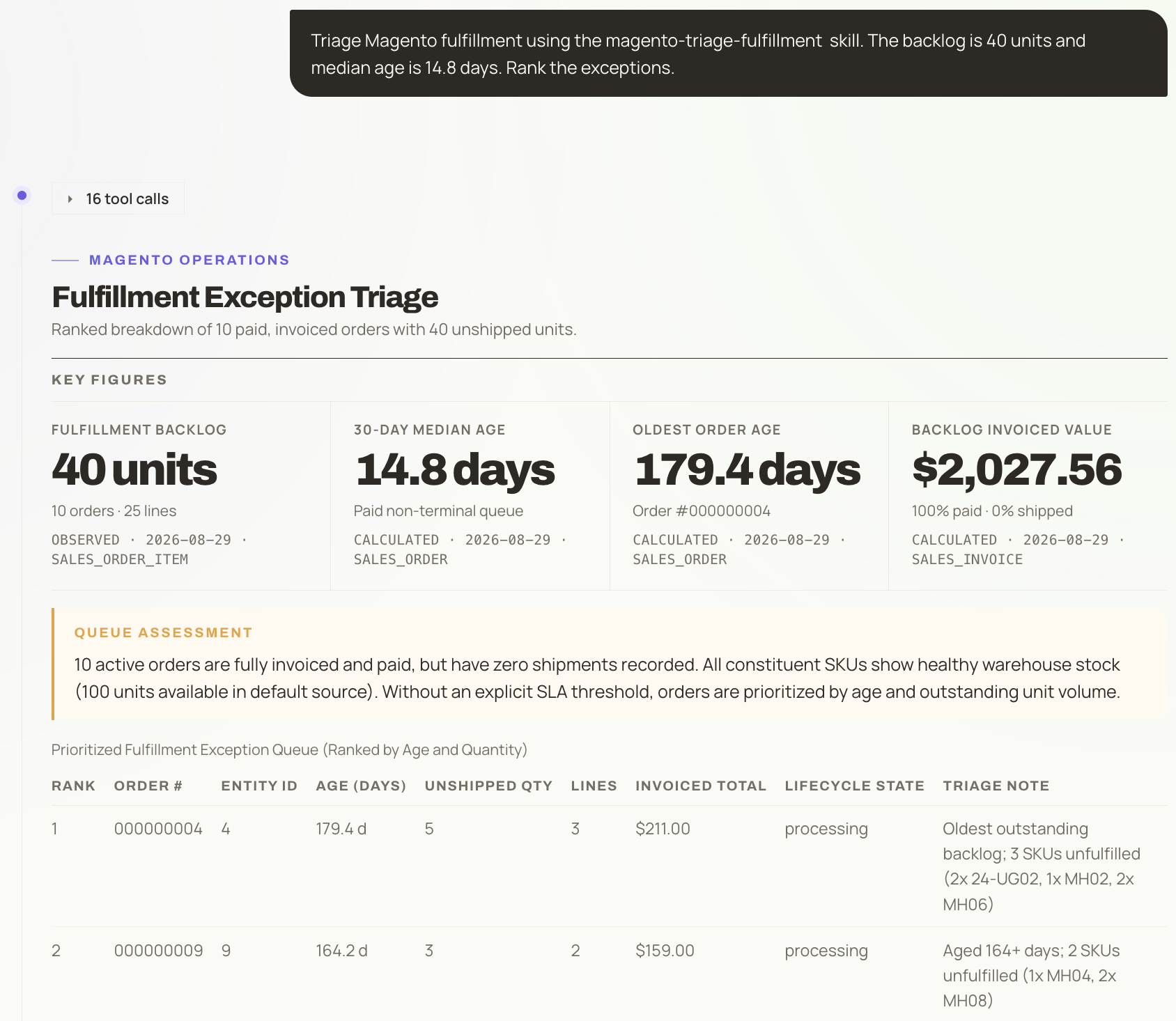
OpenNeko turns a Magento fulfillment request into a ranked exception queue, showing the backlog, order age, invoiced value and evidence behind the prioritization.
For inventory, the trigger might be a low-stock finding or a suspected Multi-Source Inventory discrepancy. The evidence separates source-level quantity from salable quantity instead of pretending they are interchangeable. If you ask for a source-item correction, OpenNeko shows the current and proposed values before requesting approval.
For store health, a failed cron job or unhealthy indexer is the beginning of the investigation. OpenNeko connects it to the affected catalog, inventory or order process, then prepares the next technical check. It does not claim that a red health signal is itself a root cause.
For refund or cancellation spikes, the result is a bounded investigation of the affected period, store, orders and SKUs. OpenNeko can prepare the evidence for a decision, but it cannot send money or approve a return.
These are deliberately constrained tasks. Their value comes from reducing the time spent assembling evidence and carrying approved work through to a checked result.
Fewer workflow modules, not the end of Magento extensions
OpenNeko reduces the need to install another extension every time you need a new way to see, decide or act on data Magento already holds.
Your store will still need extensions that add external services or behavior in Magento's request path. You will still need developers for core upgrades, extension compatibility, production configuration and code-level incidents.
OpenNeko can consolidate some thin workflow tools because the same operating layer can use order, fulfillment, inventory and refund context together. A store briefing and a price change can also share your approval policy and action history.
That consolidation should be proven one workflow at a time. It should not be promised as a wholesale extension replacement.
The first deployment can remain read-only
OpenNeko begins with a dedicated read-only Magento database account. A Magento Integration token is optional and only needed for governed changes. OpenNeko never asks for the Magento admin password.
Permissions are granted by domain. If the token lacks catalog, inventory, order or promotion access, that area remains view-only. You can begin with investigation, inspect the evidence and add write authority later.
State-changing work follows the configured approval policy and leaves an attributable record. Online refunds, return approvals, store credit above its cap and financial configuration have no execution route.
OpenNeko runs in infrastructure you control. Agent and plugin execution takes place in isolated sandboxes with network access denied by default, and the model credential stays outside the sandbox. The exact mechanism and verification steps are documented in OpenShell security.
Start with one repeated job
Choose a workflow that is frequent, expensive and easy to verify. Bulk pricing is a strong candidate. So is the daily search for paid but unshipped orders. If recurring cron and indexer incidents consume your time, begin with a store-health briefing.
Measure how long the job takes today, how often it needs specialist help and how many records require repair after execution. Give OpenNeko the minimum access required. Review every proposed action until you trust the evidence and the boundaries.
Then examine the next request that would normally send you to the Magento Marketplace.
Magento already gives your business powerful machinery. OpenNeko reduces the specialist effort required to operate it. The next requirement may still need an extension, but an extension should no longer be the default answer.